
In Wicket, a page is a Java class with an HTML file of the same name. When you subclass a page in Java, the subclass inherits fields and methods as usual. Wicket extends that inheritance to the HTML: a subclass can use its parent’s markup, or add its own markup into a slot the parent leaves open. This is markup inheritance, and it is the usual way a Wicket application gives all its pages the same layout.
Where a class finds its markup
When Wicket needs the markup of a page or panel, it looks for a file named after the class, in the class’s package. If there is none, it looks for the file of the superclass, then of its superclass, up the hierarchy. The first file it finds is used.
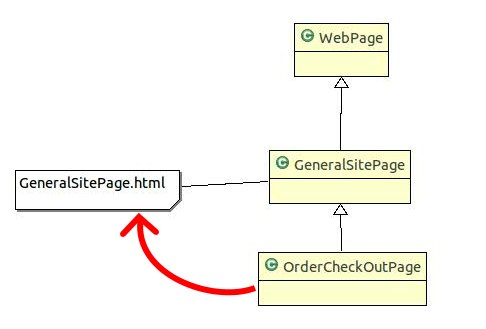
So a subclass without an HTML file renders with its parent’s markup, unchanged. That alone is useful when a subclass only changes behavior: it inherits the parent’s components and their tags, and overrides some methods. If no class in the hierarchy has a file, rendering fails with a MarkupNotFoundException.
A subclass with its own file, on the other hand, replaces the parent’s markup completely, unless the file says otherwise.
Extending the parent’s markup
Most of the time a subclass needs both: the parent’s layout around it, its own content inside. The parent marks the place for that content with <wicket:child/>. The subclass writes its content inside <wicket:extend> in its own file:
BasePage.html
<body>
  <header wicket:id="header"></header>
  <main><wicket:child/></main>
  <footer>Example Inc.</footer>
</body>
ProductPage.html
<body>
  <wicket:extend>
    <h1 wicket:id="name">Product name</h1>
  </wicket:extend>
</body>
Wicket merges the two when it loads the markup: the content of <wicket:extend> takes the place of <wicket:child/>. Everything outside <wicket:extend> in the subclass’s file is ignored, so the file can be a complete HTML page for previewing. The merge happens once, and the merged result is cached like any other markup.
From then on, Wicket sees one markup file for ProductPage. That has consequences on the Java side too. The header component, added in BasePage’s constructor, and the name label, added in ProductPage’s constructor, are both children of the same page. The ids of the two classes share one namespace, and the subclass adds its components with a plain add, without knowing about the parent’s structure. If a subclass adds a component but forgets to write its tag inside <wicket:extend>, development mode reports that the component failed to render, and the message reminds you of <wicket:extend>.
The head of the page
The <head> of the parent’s file is used for the merged page. A subclass contributes to it with a <wicket:head> section next to its <wicket:extend>. Wicket keeps the <wicket:head> sections of every level, so each class in the hierarchy can add its own styles, scripts or <meta> tags. For CSS and JavaScript files, contributing from Java with renderHead is usually the better choice: it works the same for pages and panels, and Wicket can order the resources and handle their dependencies.
Deep hierarchies, one slot per level
Inheritance can go several levels deep: BasePage frames the site, ShopPage extends BasePage adds a shop navigation and its own <wicket:child/>, and ProductPage extends ShopPage fills that. Each level’s <wicket:extend> may contain a new <wicket:child/> for the next level.
What a level cannot have is more than one slot. Markup inheritance follows single inheritance: one parent, one <wicket:child>. A layout with several areas that differ per page, say a sidebar and a main column, does not fit into one slot. For those areas, combine inheritance with panels: the base page adds a panel created by a method that subclasses override.
public abstract class BasePage extends WebPage {
    @Override
    protected void onInitialize() {
        super.onInitialize();
        add(newSidebar("sidebar"));
    }

    protected Component newSidebar(String id) {
        return new EmptyPanel(id);
    }
}
The factory method is called from onInitialize, not the constructor. A subclass’s override may use fields that the subclass’s constructor sets, and those are not set yet while the parent’s constructor runs.
Inheritance and composition
Panels and markup inheritance solve different parts of the same problem. A panel is composition: a self-contained piece of user interface, with its own class and file, that a page places where it wants. Markup inheritance is a template: the parent decides the frame, and subclasses fill it in.
A typical application uses both. Header, menu and footer are panels, because they are self-contained and sometimes appear elsewhere too. A base page puts them in place and leaves a <wicket:child/> for the content. Each page extends the base page and writes only its content. The alternative without inheritance, a base page with a placeholder component that every subclass replaces with a content panel, works too, but it forces a panel class and file on every page, where markup inheritance needs only the page’s own file.
The cost of inheritance is coupling. A subclass depends on the ids and slots of all its ancestors, and a change in the base page reaches every page. Keep base pages small and stable, and move parts that vary into panels that subclasses can swap.
Panels inherit markup too
Everything above holds for panels. A panel subclass without a file uses its parent’s markup. A base panel can put <wicket:child/> inside its <wicket:panel>, and a subclass then writes its part in <wicket:extend>. This is how a family of similar panels, say several kinds of dashboard widgets with the same title bar, can share their frame.
To build a page layout step by step, follow the tutorial Give every page the same layout. The tags are described in Wicket tags and attributes.