
A stateful page has to outlive the request that created it, and earlier versions of it have to stay available for the back button. Wicket keeps them in a chain of page stores, each handling one concern: holding pages during the request, caching the last one in the session, serializing, writing in the background, encrypting, and writing to disk.
Finding the page for a request
For each request that targets a page, Wicket asks an IPageProvider for the instance. The provider uses an IPageSource, which takes one of two routes:
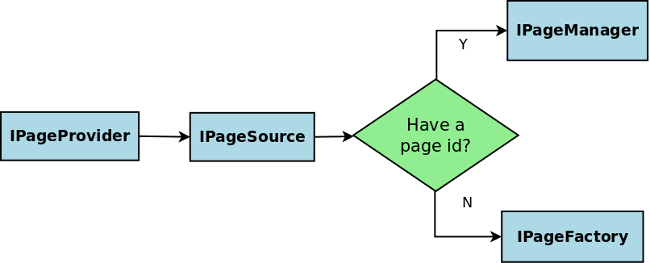
- The URL has a page id, such as
?3: theIPageManagerlooks the page up in the stores. - The URL has no page id, or the page is gone: the
IPageFactorycreates a new instance from the page class and itsPageParameters.
The IPageManager is the session’s entry point to the stores. It records every page that the request touches, which can be more than one when a handler calls setResponsePage(), and at the end of the request passes the stateful ones to the stores. Stateless pages are never stored.
The default chain
DefaultPageManagerProvider builds this chain, from the request to the disk:
| Store | Role |
|---|---|
RequestPageStore |
holds the pages used in this request; adds them to the next store when the request is detached |
CachingPageStore with an InSessionPageStore
|
keeps the last page used, as a live object, in the HTTP session |
SerializingPageStore |
turns pages into SerializedPages: page id, page class and bytes |
AsynchronousPageStore |
hands the bytes to a background thread, so the request does not wait for the disk; on by default |
CryptingPageStore |
encrypts the bytes with a key kept in the session; off by default |
DiskPageStore |
writes the bytes to a file per session |
The three levels a page can be found on look like this:
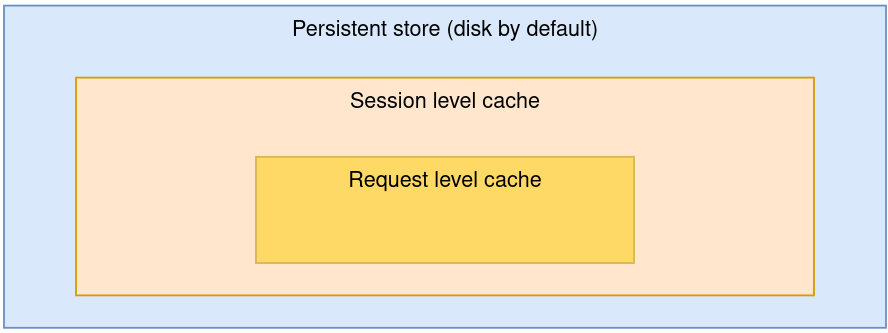
Reading goes the same way. A page used again in the same request comes from the request store. A click on the page the user just saw finds it in the session cache, without deserializing. Only the back button, or a second browser tab on another page, reaches the disk, and those pages are deserialized from bytes.
Why the pages are serialized
The back button needs the earlier state of a page, not the current one. Keeping a live object is not enough, because the next request changes that same object. Serializing after each request freezes a copy. A chain needs at least one store that makes such copies, or the back button shows the current state.
Serialization is also what turns a page into bytes for the disk, or for a database or cache in other stores. Wicket uses the ISerializer from FrameworkSettings.getSerializer(), by default JavaSerializer with standard Java serialization. This is why everything a page references must be serializable, and why detachable models matter: their data is dropped before this step.
The disk store
DiskPageStore keeps one file named data per session, in a folder named after the application followed by -filestore. That folder is created in the folder from StoreSettings.getFileStoreFolder(), by default the servlet container’s temporary directory. The file has a maximum size per session, 10 MB by default; when it is full, new pages overwrite the oldest ones. Pages that have been overwritten are gone, and a request for them ends in a PageExpiredException or, for bookmarkable pages, a new instance.
When the HTTP session ends, the store removes the session’s pages.
The disk store keeps the pages of a session in one file, with the most recent ones winning. Several browser tabs with Ajax timers can push each other’s pages out. FilePageStore, which writes a file per page, avoids that.
The session cache and clustering
The session holds only the last page used, as a live object. When the servlet container serializes the session, to replicate it to another node or to save it on shutdown, the cached page is left out. The next request finds it in the persistent store instead. In a cluster, that store must be reachable from every node: a shared disk, a database or a distributed cache. The WicketStuff project has stores for distributed caches and databases.
Encrypted pages
CryptingPageStore encrypts the bytes of every page before they reach the disk, with a random key per session that is kept in the session. Anyone who can read the store without the session sees only ciphertext. The key does not protect against someone who controls the session itself.
Wicket deserializes whatever it reads back from the store. Treat the store as private storage either way: on a disk only the application can read, or in a database only the application can write to.
Since Wicket 11,
CryptingPageStoreuses the crypt scheme ofSecuritySettings, by default authenticated AES-256-GCM, so a page that was altered in the store fails to decrypt and is treated as missing. In Wicket 10 the cipher comes fromStoreSettings.setCrypter: the defaultDefaultCrypter(AES-256-CBC) is not authenticated, andGCMSIVCrypteris the authenticated option.
Configure the page store shows how to change the size, the folder, encryption and the stores in the chain.