
Docs Dependencies and repositories
How Maven resolves dependencies
Why your project gets the libraries and versions it gets: transitive dependencies, which version wins, managed versions, scopes and ranges.
- Holds for
- 3.93.104.0
- Kind
- Explanation
- Source
- Edit this page
- Wrong?
- Report a problem
You list the libraries your code uses in the POM. Maven works out the rest: the libraries those libraries need, one version of each, and which of them go on which classpath. This page explains how it decides, so that you can predict the outcome and recognise it in mvn dependency:tree.
Direct and transitive dependencies
The dependencies in your POM are direct dependencies. Each of them is published with a POM of its own, which lists the dependencies it needs; those are transitive dependencies of your project, and so are theirs, to any depth. To build the graph, Maven downloads only the POMs. The JARs come afterwards, and only for the libraries that end up in the result.
Because a library describes its own needs, you do not have to know them. A library can also change them in a new release: a transitive dependency your code happens to use can disappear when you upgrade the library that brought it in. That is why you declare what your own code uses, even when it already arrives transitively; dependency:analyze lists what you missed.
Nearest wins
The graph often contains one library in several versions, because two of your dependencies were built against different releases of it. A classpath can use only one version of a class, so Maven keeps one version of each library, chosen by its place in the graph:
- The version nearest to your project wins: the one with the fewest steps between your POM and the library. A version you declare yourself is always nearest.
- When two versions are equally near, the one met first wins, following the order of the dependencies in the POMs.
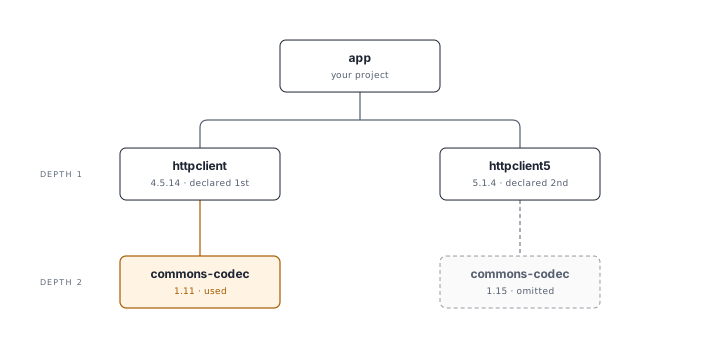
The verbose dependency tree shows the same:
mvn dependency:tree -Dverbose -Dincludes=commons-codec:commons-codec
[INFO] com.example:app:jar:1.0-SNAPSHOT
[INFO] +- org.apache.httpcomponents:httpclient:jar:4.5.14:compile
[INFO] |  \- commons-codec:commons-codec:jar:1.11:compile
[INFO] \- org.apache.httpcomponents.client5:httpclient5:jar:5.1.4:compile
[INFO]    \- (commons-codec:commons-codec:jar:1.15:compile - omitted for conflict with 1.11)
Both versions of Commons Codec are two steps away, and httpclient comes first, so the project gets 1.11, although httpclient5 was built against 1.15. Change the order of the two dependencies and it gets 1.15.
Maven does not pick the newest version. The rule gives a predictable result that you control from your own POM: whatever a dependency asks for, you overrule it by declaring or managing the library yourself. The price is that a dependency can get an older version than it was built for, and fail at runtime with a NoSuchMethodError.
Two tools keep diverging versions in check. To choose the version yourself, manage it in <dependencyManagement>. To make the build fail when versions diverge, add a rule of the Enforcer plugin: requireUpperBoundDeps fails when a dependency gets an older version than it asks for, and dependencyConvergence fails on any difference.
Managed versions come first
<dependencyManagement> sets versions without adding dependencies. A managed version is not a candidate in the contest above: it replaces the version wherever the library appears in the graph, at any depth, and whatever the dependency's POM asks for. That makes it the tool for transitive dependencies: you choose the version of a library you do not declare.
Managed versions come from your own POM, from its parents, and from BOMs imported with scope import. Your own POM wins over its parent, and a version written in <dependencyManagement> wins over one from an imported BOM. Of two imported BOMs, the first one wins.
Only your project's management counts. The <dependencyManagement> sections in the POMs of your dependencies do not affect your build.
Maven 4: Maven 4 also applies the
<dependencyManagement>of a dependency's POM to what that dependency brings in. A library that manages the version of one of its own transitive dependencies gets that version in your project too; with Maven 3 it does not. Your own management still wins.
A managed <scope> and managed <exclusions> apply to the transitive library as well. That is useful for exclusions, and rarely what you want for a scope: a managed provided takes a library off the runtime classpath even where a dependency needs it.
Version ranges
A version can also be a range, such as [2.0,3.0]. A plain version, such as 1.0, is a preference: the rules above may replace it with another. A range is a requirement: Maven accepts only versions inside it, and of those takes the highest that the repositories have. A range anywhere in the graph overrules a plain version, also a nearer one, also one you declare yourself. With 1.0 in your POM and a dependency that asks for [2.0,3.0], you get 3.0.
When two ranges have no version in common, the build stops:
[ERROR] Failed to execute goal on project app: Could not collect dependencies for project com.example:app:jar:1.0
[ERROR] Unsolvable hard constraint combination; Could not resolve version conflict among [com.example:lib:jar:[1.0,2.0), com.example:other:jar:1.0 -> com.example:lib:jar:[2.0,3.0]]
A range makes the result depend on what the repository holds on the day of the build: a new release inside the range changes your build without a change to your POM. The POM reference describes the syntax of ranges and the order of versions.
Scopes decide classpaths and transitivity
The scope of a dependency decides on which classpaths it is, and whether it is passed on. A dependency's own test and provided dependencies never reach your project: they were for building that dependency, not for using it. A runtime dependency of a compile dependency arrives with scope runtime. Dependency scopes has the full tables.
When a library arrives through several paths with different scopes, it gets the widest of them. If you declare the library yourself, your declaration decides, and that can surprise you.
Declaring a library yourself fixes its scope
Suppose your code uses Guice, and Guice needs Guava. Your tests use Guava directly, so you add it with scope test:
pom.xml
<dependency>
  <groupId>com.google.inject</groupId>
  <artifactId>guice</artifactId>
  <version>7.0.0</version>
</dependency>
<dependency>
  <groupId>com.google.guava</groupId>
  <artifactId>guava</artifactId>
  <version>33.5.0-jre</version>
  <scope>test</scope>
</dependency>
Guava is now nearest as a direct dependency, and your declaration decides its scope: test. It drops off the main and runtime classpaths of your project, although Guice needs it at runtime. The verbose tree shows it:
mvn dependency:tree -Dverbose
[INFO] com.example:app:jar:1.0-SNAPSHOT
[INFO] +- com.google.inject:guice:jar:7.0.0:compile
[INFO] |  +- jakarta.inject:jakarta.inject-api:jar:2.0.1:compile
[INFO] |  +- aopalliance:aopalliance:jar:1.0:compile
[INFO] |  \- (com.google.guava:guava:jar:31.0.1-jre:compile - omitted for conflict with 33.5.0-jre)
[INFO] \- com.google.guava:guava:jar:33.5.0-jre:test (scope not updated to compile)
[INFO]    +- com.google.guava:failureaccess:jar:1.0.3:test
[INFO]    ...
The tests pass, because the test classpath has Guava. What fails is anything that runs the main code with the runtime classpath: a WAR built from the project, or exec:java. A project that depends on yours does get Guava, because your test dependencies are not part of what it sees, and it receives Guava from Guice with scope compile.
Declare a library that your main code needs at runtime with scope compile or runtime, even if only your tests use it directly.
Optional dependencies and exclusions
Two elements remove parts of the graph:
<optional>true</optional>on a dependency in a library's POM keeps that dependency from the projects that use the library. The library's author decides; see Make a dependency optional.<exclusions>on a dependency in your POM removes a library from everything below that dependency, in every version. You decide, for your project and for the projects that depend on it; see Exclude a transitive dependency.
Both act on one path through the graph. A library that is excluded on one path can still arrive through another.
Maven 4
Maven 4 resolves dependencies by the rules on this page, with three differences:
- It applies the
<dependencyManagement>of a dependency's POM to what that dependency brings in, as described under Managed versions come first. - With model version 4.1.0, a POM can use the scopes
compile-only,test-onlyandtest-runtime; see Dependency scopes. - A project can publish a BOM with packaging
bom; see Use a BOM, and publish one.
Maven 4 also publishes a consumer POM instead of the POM you build with. It keeps your dependencies, so projects that depend on yours resolve them as before; What's new in Maven 4 describes what it leaves out.
Inside the resolver
Maven builds the graph in three steps, carried out by Maven Resolver: it collects the graph from the POMs, transforms it by resolving the conflicts described on this page, and resolves the files of the nodes that remain. Dependency resolution misconceptions describes these steps for plugin developers who request dependency graphs themselves.