
Stateful vs stateless pages — when sessions matter
Why some pages store state in the session and others do not, and how that affects performance, bookmarkability, and scalability
Wicket pages can be divided into two categories: stateful and stateless pages. Stateful pages are those which rely on user session to store their internal state and to keep track of user interaction. On the contrary stateless pages are those which don’t change their internal state during their lifecycle and they don’t need to occupy space into user session.
From Wicket’s point of view the biggest difference between these two page types is that stateful pages are versioned, meaning that they will be saved into user session every time their internal state has changed. Wicket automatically assigns a session to the user the first time a stateful page is requested. Page versions are stored into user session using Java Serialization mechanism. Stateless pages are never versioned and that’s why they don’t require a valid user session. If we want to know whether a page is stateless or not, we can call the isPageStateless() method of class Page.
In order to build a stateless page we must comply with some rules to ensure that the page won’t need to use user session. These rules are illustrated in paragraph 8.3 but before talking about stateless pages we must first understand how stateful pages are handled and why they are versioned.
Stateful pages are versioned in order to support browser’s back button: when this button is pressed Wicket must respond by rendering the same page instance previously used.
A new page version is created when a stateful page is requested for the first time or when an existing instance is modified (for example changing its component hierarchy). To identify each page version Wicket uses a session-relative identifier called page id. This is a unique number and it is increased every time a new page version is created.
In the final example of the previous chapter (project LifeCycleStages), you may have noticed the number appended at the end of URL. This number is the page id we are talking about:
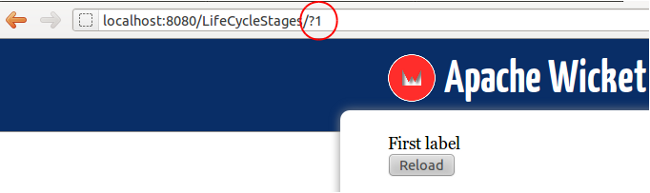
In this chapter we will use a revised version of this example project where the component hierarchy is modified inside the Link’s onClick() method. This is necessary because Wicket creates a new page version only if the page is modified before its method onBeforeRender() is invoked. The code of the new home page is the following:
public class HomePage extends WebPage
{
    private static final long serialVersionUID = 1L;
    private Label firstLabel;
    private Label secondLabel;

    public HomePage(){
        firstLabel = new Label("label", "First label");
        secondLabel = new Label("label", "Second label");

        add(firstLabel);

        add(new Link<Void>("reload"){
            @Override
            public void onClick() {
                if(getPage().contains(firstLabel, true))
                    getPage().replace(secondLabel);
                else
                    getPage().replace(firstLabel);
            }
        });

    }
}
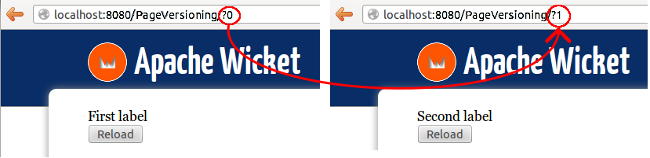
Now if we run the new example (project LifeCycleStagesRevisited) and we click on the “Reload” button, a new page version is created and the page id is increased by one:
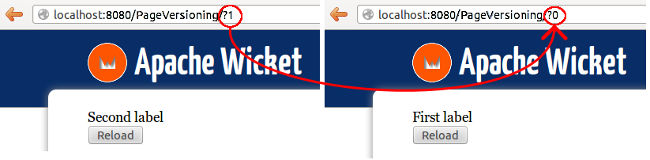
If we press the back button the page version previously rendered (and serialized) will be retrieved (i.e. deserialized) and it will be used again to respond to our request (and page id is decremented):
[!NOTE] For more details about page storing you can take a look at paragraph “Page storing” from chapter “Wicket Internals” The content of this paragraph is from wiki page https://cwiki.apache.org/confluence/display/WICKET/Page+Storage.
As we have stated at the beginning of this chapter, page versions are stored using Java serialization, therefore every object referenced inside a page must be serializable. In paragraph 11.6 we will see how to overcome this limit and work with non-serializable objects in our components using detachable Wicket models.
Using a specific page version with PageReference
To retrieve a specific page version in our code we can use class org.apache.wicket.PageReference by providing its constructor with the corresponding page id:
//load page version with page id = 3
PageReference pageReference = new PageReference(3);
//load the related page instance
Page page = pageReference.getPage();
To get the related page instance we must use the method getPage.
Turning off page versioning
If for any reason we need to switch off versioning for a given page, we can call its method setVersioned(false).
Pluggable serialization
Wicket serializes pages using an implementation of interface org.apache.wicket.serialize.ISerializer. The default implementation is org.apache.wicket.serialize.java.JavaSerializer and it uses the standard Java serialization mechanism based on classes ObjectOutputStream and ObjectInputStream. However on internet we can find other interesting serialization libraries like Kryo.
We can set a custom serializer inside init method accessing Wicket settings with getFrameworkSettings():
@Override
public void init()
{
    super.init();
    getFrameworkSettings().setSerializer(yourSerializer);
}
A serializer based on Kryo library and another one based on Fast are provided by the WicketStuff project. You can find more information on this project, as well as the instructions to use its modules, in Appendix B.
Page caching
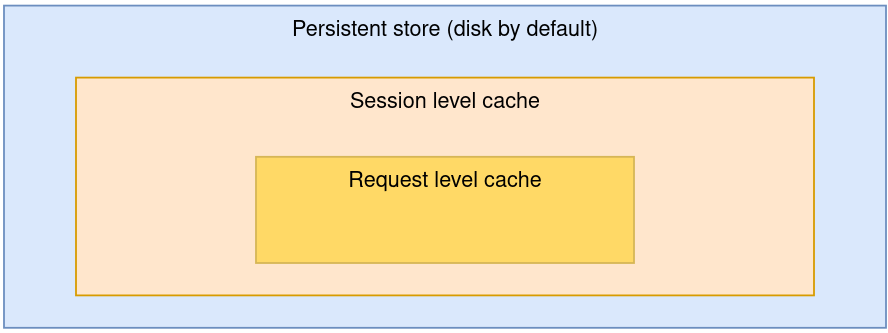
By default Wicket persists versions of pages into a session-relative file on disk, but it uses a two-level cache to speed up the access. The first level of the cache contains all the pages involved in the current requests as we may visit more than one page during a single request, for example if we have been redirected with setResponsePage. The second level cache stores the last rendered page into a session-scoped variables.
[!NOTE] Scoped variables will be introduced in chapter 9.4.6 which is about Wicket metadata.
The following picture is an overview of these two caching levels:
Wicket allows us to set the maximum size of the file used to store pages with setting class org.apache.wicket.settings.StoreSettings. This class provides the setMaxSizePerSession(Bytes bytes) method to set the size of the file. The Bytes parameter is the maximum size allowed for this file:
@Override
public void init()
{
    super.init();
    getStoreSettings().setMaxSizePerSession(Bytes.kilobytes(500));
}
Class org.apache.wicket.util.lang.Bytes is an utility class provided by Wicket to express size in bytes (for further details refer to the JavaDoc).
[!NOTE] More insights on internal page storing will be covered in chapter 26
Page expiration
Page instances are not kept in the user session forever. They can be discarded when the limit set with the setMaxSizePerSession method is reached or (more often) when user session expires. When we ask Wicket for a page id corresponding to a page instance removed from the session, we bump into a PageExpiredException and we get the following default error page:
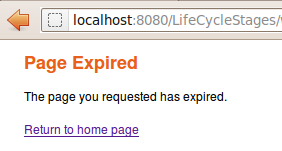
This error page can be customized with the setPageExpiredErrorPage method of class org.apache.wicket.settings.ApplicationSettings:
@Override
public void init()
{
    super.init();
    getApplicationSettings().setPageExpiredErrorPage(
                CustomExpiredErrorPage.class);
}
The page class provided as custom error page must have a public constructor with no argument or a constructor that takes as input a single PageParameters argument (the page must be bookmarkable as described in paragraph 10.1.1).
Wicket makes it very easy to build stateful pages, but sometimes we might want to use an “old school” stateless page that doesn’t keep memory of its state in the user session. For example consider the public area of a site or a login page: in those cases a stateful page would be a waste of resources or even a security threat, as we will see in paragraph paragraph 12.10.
In Wicket a page can be stateless only if it satisfies the following requirements:
-
it has been instantiated by Wicket (i.e. we don’t create it with operator new) using a constructor with no argument or a constructor that takes as input a single PageParameters argument (class PageParameters will be covered in chapter 10.1).
-
All its children components (and behaviors) are in turn stateless, which means that their method isStateless must return true.
The first requirement implies that, rather than creating a page by hand, we should rely on Wicket’s capability of resolving page instances, like we do when we use method setResponsePage(Class page).
In order to comply with the second requirement it could be helpful to check if all children components of a page are stateless. To do this we can leverage method visitChildren and the visitor pattern to iterate over components and test if their method isStateless actually returns true:
@Override
protected void onInitialize() {
    super.onInitialize();

    visitChildren((component, visit) -> {
        if(!component.isStateless()) {
           System.out.println("Component " + component.getId() + " is not stateless");
        }
    });
}
Alternatively, we could use the StatelessComponent utility annotation along with the StatelessChecker class (they are both in package org.apache.wicket.devutils.stateless). StatelessChecker will throw an IllegalArgumentException if a component annotated with StatelessComponent doesn’t respect the requirements for being stateless. To use StatelessComponent annotation we must first add the StatelessChecker to our application as a component render listener:
@Override
public void init()
{
    super.init();
    getComponentPostOnBeforeRenderListeners().add(new StatelessChecker());
}
[!NOTE] Most of the Wicket’s built-in components are stateful, hence they can not be used with a stateless page. However some of them have also a stateless version which can be adopted when we need to keep a page stateless. In the rest of the guide we will point out when a built-in component comes also with a stateless version.
A page can be also explicitly declared as stateless setting the appropriate flag to true with the setStatelessHint(true) method. This method will not prevent us from violating the requirements for a stateless page, but if we do so we will get the following warning log message:
[!WARNING] Page ’<page class>’ is not stateless because of component with path ’<component path>’