
Component lifecycle — stages and hook methods
The stages a Wicket component goes through from creation to removal, and which methods to override at each stage
During its life a Wicket component goes through the following stages:
-
Initialization: a component is instantiated and initialized by Wicket.
-
Rendering: components are prepared for rendering and generate markup. If a component contains children (i.e. is a subclass of MarkupContainer) their rendering result is included in the resulting markup.
-
Removed: this stage is triggered when a component is explicitly removed from its component hierarchy, i.e. when its parent invokes remove(component) on it. This stage is optional and is never triggered for pages.
-
Detached: after request processing has ended all components are notified to detach any state that is no longer needed.
The following picture shows the state diagram of component lifecycle:
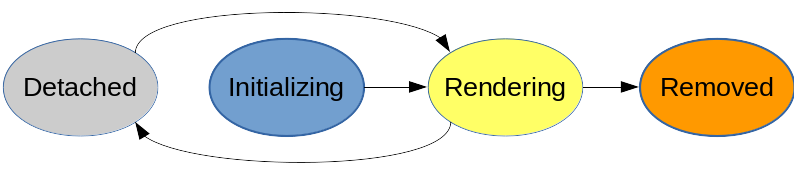
Once a component has been removed it could be added again to a container, but the initialization stage won’t be executed again - it is easier to just create a new component instance instead.
[!NOTE] If you read the JavaDoc of class Component you will find a more detailed description of component lifecycle. However this description introduces some advanced topics we haven’t covered yet hence, to avoid confusion, in this chapter some details have been omitted and they will be covered later in the next chapters.
For now you can consider just the simplified version of the lifecycle described above.
Class Component comes with a number of hook methods that can be overridden in order to customize component behavior during its lifecycle. In the following table these methods are grouped according to the stage in which they are invoked (and they are sorted by execution order):
| Cycle stage | Involved methods |
|---|---|
| Initialization | constructor, onInitialize() |
| Rendering | onConfigure(), onBeforeRender(), renderHead(), onRender(), onComponentTag(), onComponentTagBody(), onAfterRender() |
| Removed | onRemove() |
| Detached | onDetach() |
Now let’s take a closer look at each stage and its hook methods.
This stage is reached each time a component is rendered, typically when a page is requested or when the component or one of its ancestors is refreshed via AJAX.
Method onConfigure
Method onConfigure() has been introduced in order to provide a good point to manage the component states such as its visibility or enabled state. This method is called on all components whose parent is visible.
As stated in chapter 6.1, isVisible() and isEnabled() are called multiple times when a page or a component is rendered, so it’s highly recommended not to directly override these methods, but rather to use onConfigure() to change component states. On the contrary method onBeforeRender (see the next paragraph) is not recommended for this task because it will not be invoked if component visibility is set to false.
Method onBeforeRender
The most important hook method of this stage is probably onBeforeRender(). This method is called on all visible components before any of them are rendered. It is our last chance to change a component’s state prior to rendering - no change to a component’s state is allowed afterwards.
If we want to add/remove child components this is the right place to do it. In the next example (project LifeCycleStages) we will create a page which alternately displays two different labels, swapping between them each time it is rendered:
public class HomePage extends WebPage
{
    private Label firstLabel;
    private Label secondLabel;

    public HomePage(){
        firstLabel = new Label("label", "First label");
        secondLabel = new Label("label", "Second label");

        add(firstLabel);
        add(new Link<Void>("reload"){
            @Override
            public void onClick() {
            }
        });
    }

    @Override
    protected void onBeforeRender() {
        if(contains(firstLabel, true))
            replace(secondLabel);
        else
            replace(firstLabel);

        super.onBeforeRender();
    }
}
The code inside onBeforeRender() is quite trivial as it just checks which label among firstLabel and secondLabel is currently inserted into the component hierarchy and it replaces the inserted label with the other one.
This method is also responsible for invoking children onBeforeRender(). So if we decide to override it, we have to call super.onBeforeRender(). However, unlike onInitialize(), the call to superclass method should be placed at the end of method’s body in order to affect children’s rendering with our custom code.
Please note that in the example above we can trigger the rendering stage pressing F5 key or clicking on link “reload”.
[!WARNING] If we forget to call superclass version of methods onInitialize() or onBeforeRender(), Wicket will throw an IllegalStateException with the following message:
java.lang.IllegalStateException:org.apache.wicket.Componenthasnotbeenproperlyinitialized.Somethinginthehierarchyof<pageclassname>hasnotcalledsuper.onInitialize()/onBeforeRender()intheoverrideofonInitialize()/onBeforeRender()method
Method renderHead
This method gives all components the possibility to add items to the page header through its argument of type org.apache.wicket.markup.head.IHeaderResponse
Method onRender
This method does the actual rendering — you will rarely have to implement it, since most components already contain a specific implementation to produce their markup.
Method onComponentTag
Method onComponentTag(ComponentTag) is called to process a component tag, which can be freely manipulated through its argument of type org.apache.wicket.markup.ComponentTag. For example we can add/remove tag attributes with methods put(String key, String value) and remove(String key), or we can even decide to change the tag or rename it with method setName(String) (the following code is taken from project OnComponentTagExample):
Markup code:
<head>
  <meta charset="utf-8" />
  <title></title>
</head>
<body>
  <h1 wicket:id="helloMessage"></h1>
</body>
Java code:
public class HomePage extends WebPage {
   public HomePage() {
      add(new Label("helloMessage", "Hello World"){
         @Override
         protected void onComponentTag(ComponentTag tag) {
            super.onComponentTag(tag);
            //Turn the h1 tag to a span
            tag.setName("span");
            //Add formatting style
            tag.put("style", "font-weight:bold");
         }
      });
    }
}
Generated markup:
<head>
  <meta charset="utf-8" />
  <title></title>
</head>
<body>
  <span wicket:id="helloMessage" style="font-weight:bold">Hello World</span>
</body>
Just like we do with onInitialize, if we decide to override onComponentTag we must remember to call the same method of the super class because also this class may also customize the tag. Overriding onComponentTag is perfectly fine if we have to customize the tag of a specific component, but if we wanted to reuse the code across different components we should consider to use a behavior in place of this hook method.
We have already seen in chapter 6.2 how to use behavior AttributeModifier to manipulate the tag’s attribute. In chapter 19.1 we will see that base class Behavior offers also a callback method named onComponentTag(ComponentTag, Component) that can be used in place of the hook method onComponentTag(ComponentTag).
Method onComponentTagBody
Method onComponentTagBody(MarkupStream, ComponentTag) is called to process the component tag’s body. Just like onComponentTag it takes as input a ComponentTag parameter representing the component tag. In addition, we also find a MarkupStream parameter which represents the page markup stream that will be sent back to the client as response.
onComponentTagBody can be used in combination with the Component’s method replaceComponentTagBody to render a custom body under specific conditions. For example (taken from project OnComponentTagExample) we can display a brief description instead of the body if the label component is disabled:
public class HomePage extends WebPage {
   public HomePage() {

      add(new Label("helloMessage", "Hello World"){
         @Override
         protected void onComponentTagBody(MarkupStream markupStream, ComponentTag tag) {

           if(!isEnabled())
               replaceComponentTagBody(markupStream, tag, "(the component is disabled)");
          else
               super.onComponentTagBody(markupStream, tag);
         }
      });
    }
}
Note that the original version of onComponentTagBody is invoked only when we want to preserve the standard rendering mechanism for the tag’s body (in our example this happens when the component is enabled).
Method onAfterRender
Called on each rendered component immediately after it has been rendered - onAfterRender() will even be called when rendering failed with an exception.