
How to implement login
Implement authentication and login pages in Apache Wicket
The first step in implementing a security policy is assigning a trusted identity to our users, which means that we must authenticate them. Web applications usually adopt a form-based authentication with a login form that asks user for a unique username and the relative password:
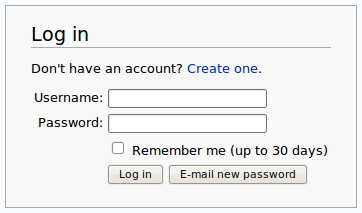
Wicket supports form-based authentication with session class AuthenticatedWebSession and application class AuthenticatedWebApplication, both placed inside package org.apache.wicket.authroles.authentication.
AuthenticatedWebSession
Class AuthenticatedWebSession comes with the following set of public methods to manage user authentication:
-
authenticate(String username, String password): this is an abstract method that must be implemented by every subclass of AuthenticatedWebSession. It should contain the actual code that checks for user’s identity. It returns a boolean value which is true if authentication has succeeded or false otherwise.
-
signIn(String username, String password): this method internally calls authenticate and set the flag signedIn to true if authentication succeeds.
-
isSignedIn():getter method for flag signedIn.
-
invalidate(): sets the flag signedIn to false and invalidates session.
-
signOut(): an alias of invalidate().
Another abstract method we must implement when we use AuthenticatedWebSession is getRoles which is inherited from parent class AbstractAuthenticatedWebSession. This method can be ignored for now as it will be discussed later when we will talk about role-based authorization.
AuthenticatedWebApplication
Class AuthenticatedWebApplication provides the following methods to support form-based authentication:
-
getWebSessionClass(): abstract method that returns the session class to use for this application. The returned class must be a subclass of AbstractAuthenticatedWebSession.
-
getSignInPageClass(): abstract method that returns the page to use as sign in page when a user must be authenticated.
-
restartResponseAtSignInPage(): forces the current response to restart at the sign in page. After we have used this method to redirect a user, we can make her/him return to the original page calling Component’s method continueToOriginalDestination().
The other methods implemented inside AuthenticatedWebApplication will be introduced when we talk about authorization.
A basic example of authentication
Project BasicAuthenticationExample is a basic example of form-based authentication implemented with classes AuthenticatedWebSession and AuthenticatedWebApplication.
The homepage of the project contains only a link to page AuthenticatedPage which can be accessed only if user is signed in. The code of AuthenticatedPage is this following:
public class AuthenticatedPage extends WebPage {
   @Override
   protected void onConfigure() {
      super.onConfigure();
      AuthenticatedWebApplication app = (AuthenticatedWebApplication)Application.get();
      //if user is not signed in, redirect him to sign in page
      if(!AuthenticatedWebSession.get().isSignedIn())
         app.restartResponseAtSignInPage();
   }

   @Override
   protected void onInitialize() {
      super.onInitialize();
      add(new BookmarkablePageLink<Void>("goToHomePage", getApplication().getHomePage()));

      add(new Link<Void>("logOut") {

         @Override
         public void onClick() {
            AuthenticatedWebSession.get().invalidate();
            setResponsePage(getApplication().getHomePage());
         }
      });
   }
}
Page AuthenticatedPage checks inside onConfigure if user is signed in and if not, it redirects her/him to the sign in page with method restartResponseAtSignInPage. The page contains also a link to the homepage and another link that signs out user.
The sign in page is implemented in class SignInPage and contains the form used to authenticate users:
public class SignInPage extends WebPage {
   private String username;
   private String password;

   @Override
   protected void onInitialize() {
      super.onInitialize();

      StatelessForm<Void> form = new StatelessForm<Void>("form") {
         @Override
         protected void onSubmit() {
            if(Strings.isEmpty(username))
               return;

            boolean authResult = AuthenticatedWebSession.get().signIn(username, password);
            //if authentication succeeds redirect user to the requested page
            if(authResult)
               continueToOriginalDestination();
         }
      };

      form.setModel(new CompoundPropertyModel(this));

      form.add(new TextField("username"));
      form.add(new PasswordTextField("password"));

      add(form);
   }
}
The form is responsible for handling user authentication inside its method onSubmit(). The username and password are passed to AuthenticatedWebSession’s method signIn(username, password) and if authentication succeeds, the user is redirected to the original page with method continueToOriginalDestination.
The session class and the application class used in the project are reported here:
Session class:
public class BasicAuthenticationSession extends AuthenticatedWebSession {

    public BasicAuthenticationSession(Request request) {
        super(request);
    }

    @Override
    public boolean authenticate(String username, String password) {
          //user is authenticated if both username and password are equal to 'wicketer'
        return username.equals(password) && username.equals("wicketer");
    }

    @Override
    public Roles getRoles() {
        return new Roles();
    }
}
Application class:
public class WicketApplication extends AuthenticatedWebApplication {
    @Override
    public Class<HomePage> getHomePage(){
        return HomePage.class;
    }

    @Override
    protected Class<? extends AbstractAuthenticatedWebSession> getWebSessionClass(){
        return BasicAuthenticationSession.class;
    }

    @Override
    protected Class<? extends WebPage> getSignInPageClass() {
        return SignInPage.class;
    }
}
The authentication logic inside authenticate has been kept quite trivial in order to make the code as clean as possible. Please note also that session class must have a constructor that accepts an instance of class Request.
Redirecting user to an intermediate page
Method restartResponseAtSignInPage is an example of redirecting user to an intermediate page before allowing him to access to the requested page. This method internally throws exception org.apache.wicket.RestartResponseAtInterceptPageException which saves the URL and the parameters of the requested page into session metadata and then redirects user to the page passed as constructor parameter (the sign in page).
Component’s method redirectToInterceptPage(Page) works in much the same way as restartResponseAtSignInPage but it allows us to specify which page to use as intermediate page:
redirectToInterceptPage(intermediatePage);
[!NOTE] Since both restartResponseAtSignInPage and redirectToInterceptPage internally throw an exception, the code placed after them will not be executed.