
How to make your application multilingual
Learn how to set the user's locale and provide translated strings through properties files
A component can get the current locale in use calling its method getLocale(). By default this method will be recursively called on component’s parent containers until one of them returns a valid locale. If no one of them returns a locale, this method will get the one associated with the current user session. This locale is automatically generated by Wicket in accordance with the language settings of the browser.
Developers can change the locale of the current session with Session’s method setLocale (Locale locale):
Session.get().setLocale(locale)
Style and variation parameters for bundles
In addition to locale’s information, Wicket supports two further parameters to identify a resource bundle: style and variation. Parameter style is a string value and is defined at session-level. To set/get the style for the current session we can use the corresponding setter and getter of class Session:
Session.get().setStyle("myStyle");
Session.get().getStyle();
If set, style’s value contributes to the final full name of the bundle and it is placed between the base name and the locale’s information:
<base name>[_style][_<language code>[_<COUNTRY_CODE>[_<variant code>]]]
Wicket gives the priority to candidate names containing the style information (if available). The other parameter we can use for localization is variation. Just like style also variation is a string value, but it is defined at component-level. The value of variation is returned by Component’s method getVariation(). By default this method returns the variation of the parent component or a null value if a component hasn’t a parent (i.e. it’s a page). If we want to customize this parameter we must overwrite method getVariation and make it return the desired value.
Variation’s value contributes to the final full name of the bundle and is placed before style parameter:
<base name>[_variation][_style][_<language code>[_<COUNTRY_CODE>[_<variant code>]]]
Using UTF-8 for resource bundles
Java uses the standard character set ISO 8859-1 to encode text files like properties files. Unfortunately ISO 8859-1 does not support most of the extra-European languages like Chinese or Japanese. The only way to use properties files with such languages is to use escaped Unicode characters, but this leads to not human-readable files. For example if we wanted to write the word ’website’ in simplified Chinese (the ideograms are 网站) we should write the Unicode characters u7F51u7AD9. For this reason ISO 8859-1 is being replaced with another Unicode-compliant character encoding called UTF-8. Text files created with this encoding can contain Unicode symbols in plain format. Wicket provides a useful convention to use properties file encoded with UTF-8. We just have to add prefix .utf8. to file extension (i.e. .utf8.properties).
[!NOTE] If you want to use UTF-8 with your text files, make sure that your editor/IDE is actually using this character encoding. Some OS like Windows use a different encoding by default.
Using XML files as resource bundles
Starting from version 1.5, Java introduced the support for XML files as resource bundles. XML files are generally encoded with character sets UTF-8 or UTF-16 which support every symbol of the Unicode standard. In order to be a valid resource bundle the XML file must conform to the DTD available at http://java.sun.com/dtd/properties.dtd .
Here is an example of XML resource bundle taken from project LocalizedGreetings (file WicketApplication_zh.properties.xml) containing the translation in simplified Chinese of the greeting message “Welcome to the website!”:
<?xml version="1.0" encoding="UTF-8"?>
<!DOCTYPE properties SYSTEM "http://java.sun.com/dtd/properties.dtd">
<properties>
    <entry key="greetingMessage">欢迎光临本网站!</entry>
</properties>
To use XML bundles in Wicket we don’t need to put in place any additional configuration. The only rule we have to respect with these files is to use properties.xml as extension while their base name follows the same rules seen so far for bundle names.
Reading bundles from code
Class Component makes reading bundles very easy with method getString(String key). This method searches for a resource with the given key looking into the resource bundles visited by the lookup algorithm illustrated in paragraph 15.3. For example if we have a greeting message with key greetingMessage in our application’s resource bundle, we can read it from our component code with this instruction:
getString("greetingMessage");
Localization of bundles in Wicket
In paragraph 12.2 we have used as resource bundle the properties file placed next to our application class. This file is the default resource bundle for the entire application and it is used by the lookup algorithm if it doesn’t find any better match for a given component and locale. If we want to provide localized versions of this file we must simply follow the rules of Java i18n and put our translated resources into another properties file with a name corresponding to the desired locale. For example project LocalizedGreetings comes with the default application’s properties file ( WicketApplication.properties) containing a greeting message:
greetingMessage=Welcome to the site!
Along with this file we can also find a bundle for German (WicketApplication_de.properties) and another one in XML format for simplified Chinese (WicketApplication_zh.properties.xml). The example project consists of a single page (HomePage.java) displaying the greeting message. The current locale can be changed with a drop-down list and the possible options are English (the default one), German and simplified Chinese:
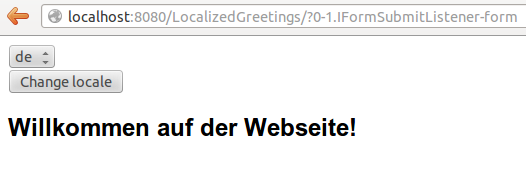
The label displaying the greeting message has a custom read-only model which returns the message with method getString. The initialization code for this label is this:
IModel<String> model = () -> getString("greetingMessage");

add(new Label("greetingMessage", model));
The rest of the code of the home page builds the stateless form and the drop-down menu used to change the locale.
List<Locale> locales = Arrays.asList(Locale.ENGLISH, Locale.CHINESE, Locale.GERMAN);
final DropDownChoice<Locale> changeLocale =
             new DropDownChoice<Locale>("changeLocale", new Model<Locale>(), locales);

StatelessForm<Void> form = new StatelessForm<Void>("form"){
    @Override
    protected void onSubmit() {
        Session.get().setLocale(changeLocale.getModelObject());
    }
};

setStatelessHint(true);
add(form.add(changeLocale))
Localization of markup files
Although resource bundles exist to extract local-dependent elements from our code and from UI components, in Wicket we can decide to provide different markup files for different locale settings. Just like standard markup files, by default localized markup files must be placed next to component’s class and their file name must contain the locale’s information. In the following picture, CustomPanel comes with a standard (or default) markup file and with another one localized for German:
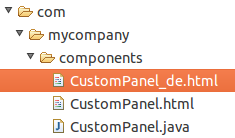
When the current locale corresponds to German country (language code de), markup file CustomPanel_de.html will be used in place of the default one.
Reading bundles with tag <wicket:message>
String resources can be also retrieved directly from markup code using tag <wicket:message>. The key of the desired resource is specified with attribute key:
<wicket:message key="greetingMessage">message goes here</wicket:message>
By default the resource value is not escaped for HTML entities. To do that use the escape attribute:
<wicket:message key="greetingMessage" escape="true">message goes here</wicket:message>
wicket:message can be adopted also to localize the attributes of a tag. The name of the attribute and the resource key are expressed as a colon-separated value. In the following markup the content of attribute value will be replaced with the localized resource having ’key4value’ as key:
<input type="submit" value="Preview value" wicket:message="value:key4value"/>
If we want to specify multiple attributes at once, we can separate them with a comma:
<input type="submit" value="Preview value" wicket:message="value:key4value, title:key4title"/>
Finally, we can work with more complex text templates nesting components within a wicket:message element. For example:
<wicket:message key="myKey">
  This text will be replaced with text from the properties file.
  <span wicket:id="amount">[amount]</span>.
  <a wicket:id="link">
    <wicket:message key="linkText"/>
  </a>
</wicket:message>
myKey=Your balance is ${amount}. Click ${link} to view the details.
linkText=here
and
add(new Label("amount",new Model("$5.00")));
add(new BookmarkablePageLink("link",DetailsPage.class));
Results in:
Your balance is $5.00. Click <a href="...">here</a> to view the details.