
How to test pages with WicketTester
Use WicketTester to unit test your Wicket pages and components
A good way to start getting confident with Wicket unit testing support is looking at the test case class TestHomePage that is automatically generated by Maven when we use Wicket archetype to create a new project:
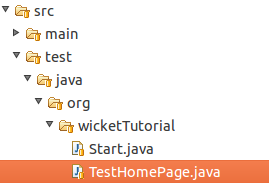
Here is the content of TestHomePage:
class TestHomePage{
    private WicketTester tester;

    @BeforeEach
    void setUp(){
        tester = new WicketTester(new WicketApplication());
    }
    @Test
    void homepageRendersSuccessfully(){
        //start and render the test page
        tester.startPage(HomePage.class);
        //assert rendered page class
        tester.assertRenderedPage(HomePage.class);
    }
}
The central class in a Wicket testing is org.apache.wicket.util.tester.WicketTester. This utility class provides a set of methods to render a component, click links, check if page contains a given component or a feedback message, and so on.
The basic test case shipped with TestHomePage illustrates how WicketTester is typically instantiated (inside method setUp()). In order to test our components, WicketTester needs to use an instance of WebApplication. Usually, we will use our application class as WebApplication, but we can also decide to build WicketTester invoking its no-argument constructor and letting it automatically build a mock web application (an instance of class org.apache.wicket.mock.MockApplication).
The code from TestHomePage introduces two basic methods to test our pages. The first is method startPage that renders a new instance of the given page class and sets it as current rendered page for WicketTester. The second method is assertRenderedPage which checks if the current rendered page is an instance of the given class. In this way if TestHomePage succeeds we are sure that page HomePage has been rendered without any problem. The last rendered page can be retrieved with method getLastRenderedPage.
That’s only a taste of what WicketTester can do. In the next paragraphs we will see how it can be used to test every element that composes a Wicket page (links, models, behaviors, etc…).
Testing links
A click on a Wicket link can be simulated with method clickLink which takes in input the link component or the page-relative path to it.
To see an example of usage of clickLink, let’s consider again project LifeCycleStagesRevisited. As we know from chapter 5 the home page of the project alternately displays two different labels (“First label” and “Second label”), swapping between them each time button “reload” is clicked. The code from its test case checks that label has actually changed after button “reload” has been pressed:
//...
@Test
void switchLabelTest(){
    //start and render the test page
    tester.startPage(HomePage.class);
    //assert rendered page class
    tester.assertRenderedPage(HomePage.class);
    //assert rendered label
    tester.assertLabel("label", "First label");
    //simulate a click on "reload" button
    tester.clickLink("reload");
    //assert rendered label
    tester.assertLabel("label", "Second label");
}
//...
In the code above we have used clickLink to click on the “reload” button and force page to be rendered again. In addition, we have used also method assertLabel that checks if a given label contains the expected text.
By default clickLink assumes that AJAX is enabled on client side. To switch AJAX off we can use another version of this method that takes in input the path to the link component and a boolean flag that indicates if AJAX must be enabled (true) or not (false).
//...
//simulate a click on a button without AJAX support
tester.clickLink("reload", false);
//...
Testing component status
WicketTester provides also a set of methods to test the states of a component. They are:
-
assertEnabled(String path)/assertDisabled(String path): they test if a component is enabled or not.
-
assertVisible(String path)/assertInvisible(String path): they test component visibility.
-
assertRequired(String path): checks if a form component is required.
In the test case from project CustomDatepickerAjax we used assertEnabled/assertDisabled to check if button “update” really disables our datepicker:
//...
@Test
void testDisableDatePickerWithButton(){
    //start and render the test page
    tester.startPage(HomePage.class);
    //assert that datepicker is enabled
    tester.assertEnabled("form:datepicker");
    //click on update button to disable datepicker
    tester.clickLink("update");
    //assert that datepicker is disabled
    tester.assertDisabled("form:datepicker");
}
//...
Testing components in isolation
Method startComponentInPage(Component) can be used to test a component in isolation. The target component is rendered in an automatically generated page and both onInitialize() and onBeforeRender() are executed. In the test case from project CustomFormComponentPanel we used this method to check if our custom form component correctly renders its internal label:
//...
@Test
void testCustomPanelContainsLabel(){
    TemperatureDegreeField field = new TemperatureDegreeField("field", Model.of(0.00));
    //Use standard JUnit class Assertions
    Assertions.assertNull(field.get("measurementUnit"));
    tester.startComponentInPage(field);
    Assertions.assertNotNull(field.get("measurementUnit"));
}
//...
Testing the response
WicketTester allows us to access to the last response generated during testing with method getLastResponse(). The returned value is an instance of class MockHttpServletResponse that provides helper methods to extract information from mocked request.
In the test case from project CustomResourceMounting we extract the text contained in the last response with method getDocument and we check if it is equal to the RSS feed used for the test:
//...
@Test
void testMountedResourceResponse() throws IOException, FeedException{tester.startResource(new RSSProducerResource());
    String responseTxt = tester.getLastResponse().getDocument();
    //write the RSS feed used in the test into a ByteArrayOutputStream
    ByteArrayOutputStream outputStream = new ByteArrayOutputStream();
    Writer writer = new OutputStreamWriter(outputStream);
    SyndFeedOutput output = new SyndFeedOutput();

    output.output(RSSProducerResource.getFeed(), writer);
    //the response and the RSS must be equal
    Assertions.assertEquals(responseTxt, outputStream.toString());
}
//...
To simulate a request to the custom resource we used method startResource which can be used also with resource references.
getLastResponse() should be used to assert the status code, response headers, binary content and anything that is part of the HTTP response.
Testing URLs
WicketTester can be pointed to an arbitrary URL with method executeUrl(String url). This can be useful to test mounted pages, resources or request mappers:
//...
//the resource was mapped at '/foo/bar'
tester.executeUrl("./foo/bar");
//...
Testing AJAX components
If our application uses AJAX to refresh components markup, we can test if AjaxRequestTarget contains a given component with WicketTester’s method assertComponentOnAjaxResponse:
//...
//test if AjaxRequestTarget contains a component (using its instance)
tester.assertComponentOnAjaxResponse(amountLabel);
//...
//test if AjaxRequestTarget contains a component (using its path)
tester.assertComponentOnAjaxResponse("pathToLabel:labelId");
It’s also possible to use method isComponentOnAjaxResponse(Component cmp) to know if a component has been added to AjaxRequestTarget:
//...
//test if AjaxRequestTarget does NOT contain amountLabel
assertFalse(tester.isComponentOnAjaxResponse(amountLabel));
//...
Testing AJAX events
Behavior AjaxEventBehavior and its subclasses can be tested simulating AJAX events with WicketTester’s method executeAjaxEvent(Component cmp, String event). Here is the sample code from project TestAjaxEventsExample:
Home page code:
public class HomePage extends WebPage {
 public static String INIT_VALUE = "Initial value";
 public static String OTHER_VALUE = "Other value";

 public HomePage(final PageParameters parameters) {
    super(parameters);
    Label label;
    add(label = new Label("label", INIT_VALUE));
    label.add(new AjaxEventBehavior("click") {

        @Override
        protected void onEvent(AjaxRequestTarget target) {
            //change label's data object
            getComponent().setDefaultModelObject(
                                                  OTHER_VALUE);
            target.add(getComponent());
        }
    }).setOutputMarkupId(true);
    //...
 }
}
Test method:
@Test
void testAjaxBehavior(){
    //start and render the test page
    tester.startPage(HomePage.class);
    //test if label has the initial expected value
    tester.assertLabel("label", HomePage.INIT_VALUE);
    //simulate an AJAX "click" event
    tester.executeAjaxEvent("label", "click");
    //test if label has changed as expected
    tester.assertLabel("label", HomePage.OTHER_VALUE);
}
Testing AJAX behaviors
To test a generic AJAX behavior we can simulate a request to it using WicketTester’s method executeBehavior(AbstractAjaxBehavior behavior):
//...
AjaxFormComponentUpdatingBehavior ajaxBehavior =
        new AjaxFormComponentUpdatingBehavior("change"){
    @Override
    protected void onUpdate(AjaxRequestTarget target) {
        //...
    }
};
component.add(ajaxBehavior);
//...
//execute AJAX behavior, i.e. onUpdate will be invoked
tester.executeBehavior(ajaxBehavior));
//...
Using a custom servlet context
In paragraph 16.13 we have seen how to configure our application to store resource files into a custom folder placed inside webapp root folder (see project CustomFolder4MarkupExample).
In order to write testing code for applications that use this kind of customization, we must tell WicketTester which folder to use as webapp root. This is necessary as under test environment we don’t have any web server, hence it’s impossible for WicketTester to retrieve this parameter from servlet context.
Webapp root folder can be passed to WicketTester’s constructor as further parameter like we did in the test case of project CustomFolder4MarkupExample:
class TestHomePage{
   private WicketTester tester;

   @BeforeEach
   void setUp(){
      //build the path to webapp root folder
      File curDirectory = new File(System.getProperty("user.dir"));
      File webContextDir = new File(curDirectory, "src/main/webapp");

      tester = new WicketTester(new WicketApplication(), webContextDir.getAbsolutePath());
   }
   //test methods...
}
[!NOTE] After a test method has been executed, we may need to clear any possible side effect occurred to the Application and Session objects. This can be done invoking WicketTester’s method destroy():
@AfterEach
void tearDown(){
    //clear any side effect occurred during test.
    tester.destroy();
}
Setting request headers
In some cases you might need to set one or more specific request headers to make your test pass. This holds true when your application is protected against CSRF attacks as explained in paragraph 22.5. In this particular case in order to make your tests green you must set header request sec-fetch-site to same-site before clicking on a page link or before invoking a callback URL:
import static org.apache.wicket.protocol.http.FetchMetadataResourceIsolationPolicy.SAME_SITE;
import static org.apache.wicket.protocol.http.FetchMetadataResourceIsolationPolicy.SEC_FETCH_SITE_HEADER;

class TestHomePage
{
    private WicketTester tester;

    @BeforeEach
    void setUp()
    {
        tester = new WicketTester(new WicketApplication());
    }

    @Test
    void homepageRendersSuccessfully()
    {
        //start and render the test page
        tester.startPage(HomePage.class);

        tester.addRequestHeader(SEC_FETCH_SITE_HEADER, SAME_SITE);
        tester.clickLink("click");
    }
}
[!NOTE] keep in mind that request headers are immediately discarded after the use and thus are not re-used for following requests.